Microphone vs Wireless Earbuds: Earbuds vs the Phone Mic, Place by Place
Ranked for how you will sound to the meeting: wired earbuds with an inline/boom mic win, because the mic sits near your jaw and nothing wireless stands between it and the phone. True-wireless buds come second: convenient, and fine indoors, but their stem mics catch wind outside and their audio has to cross a Bluetooth call link. The bare phone held to your ear comes third, and it is better than people expect, because the handset's mic ends up close to your mouth. Speakerphone at arm's length is last in every place we cover. The whole ranking comes down to one thing: how far the mic is from your mouth, plus what happens to the signal on the way.
The ranking, as distance from the mouth
- 1wired earbuds with an inline/boom mic
- 2True-wireless buds
- 3bare phone held to your ear
- 4Speakerphone at arm's length
The short answer by place
The question "microphone or wireless earbuds?" has a different answer in a parked car than at a desk. Here is the grid we work from. It is an editorial judgement built from mic distance and wind exposure, not a lab measurement.
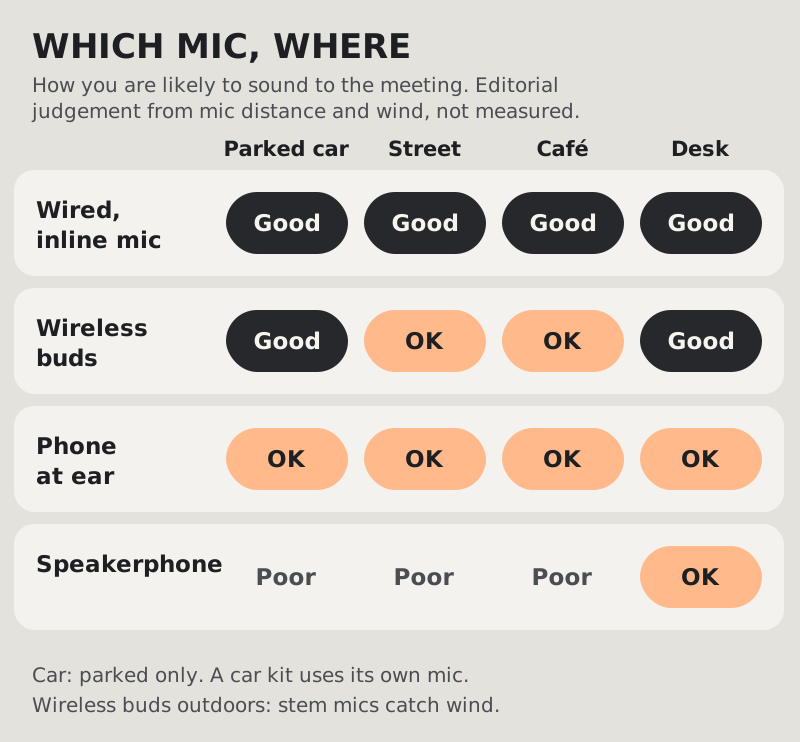
- Parked car: wired or wireless buds both work, because the cabin is quiet once the engine and fan are off. A car's own hands-free kit uses a mic in the roof lining or near the mirror, which is further away than a bud stem, so callers often hear more cabin.
- Street: wired earbuds with the mic clipped under a collar. Wireless stems point into the wind.
- Café: wired or the phone at your ear. Buds work, but crowd noise sits close to their mics.
- Desk: almost anything with a mic near your mouth. This is also the one place where laptop software can help, covered below.
1. Read the ranking by distance
- Wired inline or boom mic (winner): mic near the jawline, no battery, no pairing, no Bluetooth link. If your phone has no headphone jack, a USB-C or Lightning pair does the same job.
- True-wireless buds: the stems put the mics reasonably close and do well indoors. Outdoors, the stem catches wind first, and a low battery can end the call mid-sentence.
- Phone at your ear: the handset mic sits close to your mouth, so it sounds better than people assume. The cost is your arm and no screen.
- Speakerphone: the mic hears the whole room, the room hears the meeting, and the echo canceller works overtime. Fine for listening, poor for speaking.
Why wireless earbuds can sound worse to others
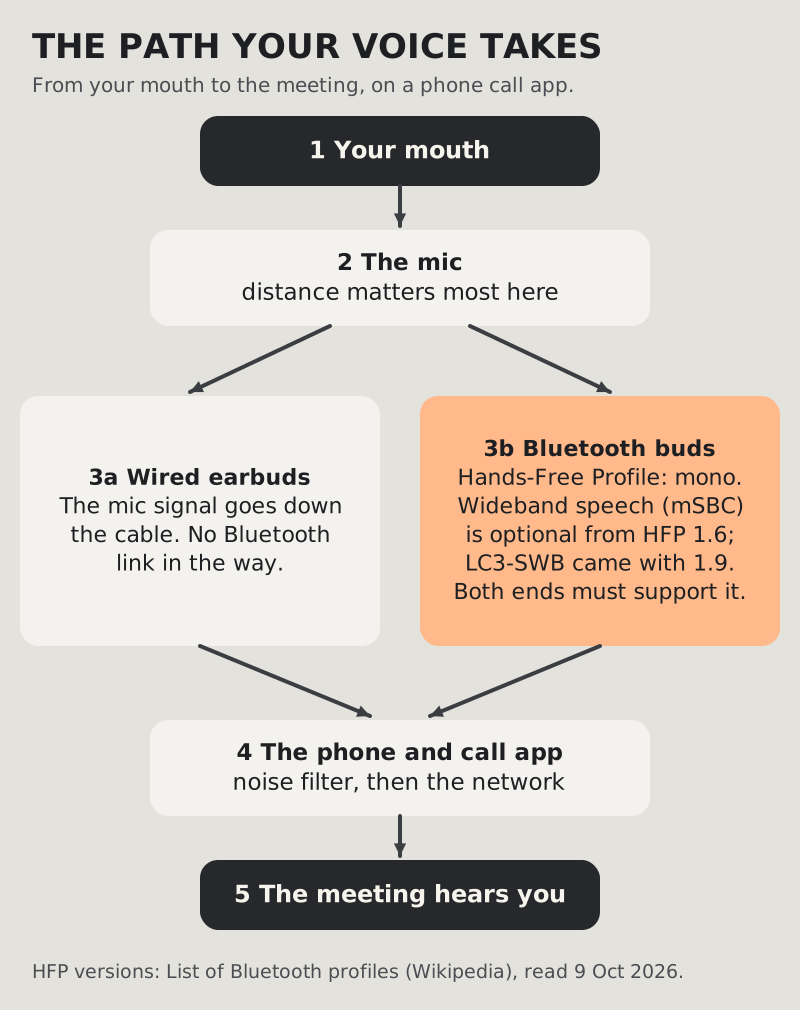
There is a second reason wireless buds can lose to a plain microphone, and it has nothing to do with distance. When you take a call on Bluetooth earbuds, your voice travels from the buds to the phone over the Hands-Free Profile, the same profile car kits use. That link carries mono audio. Its baseline codec is not wideband: wideband speech using the mSBC codec at 16 kHz is an optional feature added in HFP version 1.6, and the newer LC3-SWB codec arrived with version 1.9. Your call gets the better codec only if both the phone and the buds support it.
That is why the same pair of buds can sound fine to one caller and thin to another, and why music through those buds sounds far better than your voice coming back out of them: music uses a different, one-way profile. A wired mic skips the Bluetooth hop entirely.
2. Match the mic to the place
- Commute-heavy day: wired pair in the bag, buds in your pocket. The failure modes differ, so carry both.
- Wind-exposed work such as site visits or deliveries: wired mic clipped under your collar, and turn your back to the wind when you speak.
- Café or station: wired pair or phone to your ear. If you must use buds, keep the call short and mute between turns.
- Laptop at a hotel desk or a parked car: a headset into the laptop, and that is where desktop noise software becomes an option.
Gear sorted, laptop calls next?
No phone app filters live meeting audio the way desktop software does, and Krisp's mobile app is not built for that: its help centre says the mobile app does not support noise cancellation yet. On the laptop, Krisp cleans any call app. It costs money after a 7-day, no-card trial: Core runs $8 per user per month on yearly billing, or $16 paid monthly (Krisp pricing page, October 9, 2026).
Cover the desk calls Krisp for mobile workers — the full picture →Phone mic modes: what your phone can add
Your phone can clean up its own microphone, and on iPhone the same control reaches call apps.
iOS: in iOS 27, Apple's guide says to open Control Center during a call in the app you are using, tap that app's button at the top, then tap Voice Isolation, which "reduces background noise so your voice comes through clearly". Wide Spectrum, the opposite setting, "isn't available for all apps". Apple does not list which third-party apps support it, so check during your own call. Our iPhone noise settings explainer separates this from AirPods' listening modes.
Android: Samsung's Mic mode offers Standard, Voice focus and Full spectrum from Quick settings during a call, on regular calls through the Samsung Phone or Contacts app and on speakerphone in internet call apps on a listed set of Galaxy models. Pixel phones have Clear Calling (Settings, Sound & vibration, Clear Calling) for Phone-app calls from Pixel 7, and in internet call apps from Pixel 10, except the Pixel 10a. Our Android call noise settings guide maps them in full.
These modes work on the phone's own microphone. Samsung's support page says nothing about Bluetooth, so do not count on them when your buds are carrying the mic.
3. Set up and maintain the winner
- Keep the wired pair's connector clean; pocket lint kills more mics than drops do.
- Clip the cable so it cannot rub on fabric. The scratching your callers mention is usually the cord, not the street.
- Record a short voice memo once a month with each option and listen back on headphones. Mics degrade quietly, and you are the last to notice.
Still stuck?
- Callers say you sound thin on buds but fine on the phone? That is the Bluetooth call link. Take the call on the handset or a wired pair.
- Callers hear scratching? Cable rub. Clip it and reroute it under your jacket.
- Everything sounds distant? Check the call app's audio route: the phone may have switched back to its own mic or speaker.
- Taking a call while driving? Pull over first. Then the car-and-street guide applies: car & street survival.
Quick answers
Is a microphone better than wireless earbuds for calls?
Usually, yes. A wired mic near your mouth beats wireless buds because it sits close and skips the Bluetooth call link, which is mono and only sometimes wideband. Indoors and in a quiet car the gap is small; outdoors it grows.
Why do I sound worse on Bluetooth earbuds than on the phone?
On a call, the buds send your voice over the Bluetooth Hands-Free Profile. Wideband speech on that link is optional, so with some phone and bud pairs your voice travels in a narrower band than the phone's own mic would capture.
Are premium noise-cancelling earbuds better for meetings?
Active noise cancellation improves what you hear, not what you send. For the person listening, a cheap wired mic close to your mouth often beats premium buds, especially in wind.
Is the phone's own mic good enough for work calls?
Held to your ear, often yes: the handset mic sits close to your mouth. On speakerphone at arm's length, no. It picks up the room and risks echo.
Does Krisp work on my phone's calls?
Not for meeting apps: Krisp's help centre says the mobile app does not support noise cancellation yet. The one exception is the iOS app, which noise-cancels outgoing calls to US numbers placed through Krisp itself. For laptop calls, the desktop app works in any call app.