Samsung Voice Focus and Android Call Noise Settings, Explained
Samsung Voice Focus is one of three choices under Mic mode, a setting that tunes your phone's microphone during a call: Standard filters a little, Voice focus filters harder so your voice stands out, and Full spectrum keeps the background in. You switch it on mid-call with a two-finger swipe down to Quick settings. It works on regular cellular calls made from the Samsung Phone or Contacts app and, on a listed set of models, on speakerphone in internet call apps. If your phone is a Pixel, the equivalent is Clear Calling. Every other noise control on an Android phone belongs to the app you are calling from, which is why the same handset can sound clean on a phone call and rough on a Zoom call five minutes later.
This guide is for anyone taking work calls on an Android phone from a car park, a station or a pavement. Skip it if your calls happen at a desk on a laptop; that is a different set of tools, covered near the end. Every setting below was checked against the maker's own support page on 9 October 2026.
The settings by brand
There is no single Android switch for call noise. Each phone maker ships its own, under its own name, and each meeting app adds another layer on top. The map below covers the two phone families with clear public documentation, Samsung Galaxy and Google Pixel, plus the three meeting apps most people install. Other manufacturers ship their own call filters under different names; look in the quick settings panel while a call is running, because that is where most of them surface.
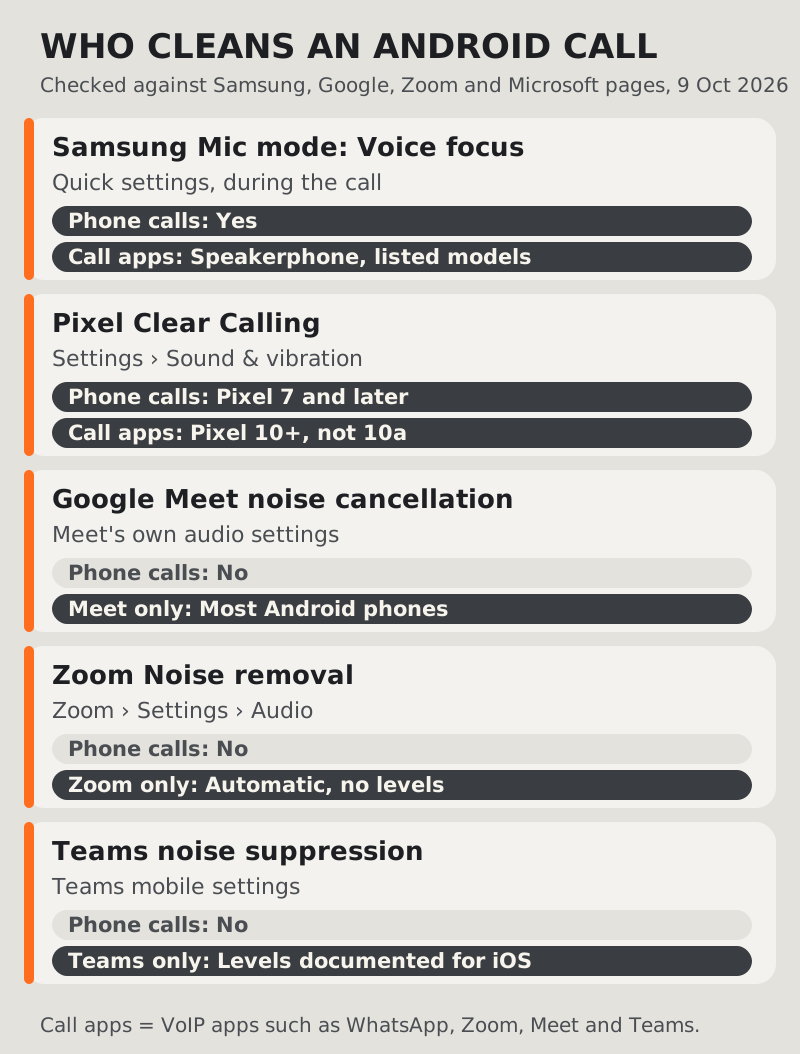
Samsung: Mic mode, with Voice focus inside it
Samsung describes three options. Standard "includes minimal audio filtering". Voice focus "includes increased audio filtering so you can focus on the caller's voice". Full spectrum "captures voice and background sounds", which is the one to pick when the background is the point: a colleague wants to hear the machine you are describing, or a family member wants the room. Samsung says Mic mode is available on "select newer Galaxy phones and tablets" and names no One UI version on that page.
Google Pixel: Clear Calling
Pixel's version lives in Settings, then Sound & vibration, then Clear Calling, where you turn on Use Clear Calling. Google's phone-app help says it covers calls in the Pixel Phone app on Pixel 7 and later, Fold models included. For internet call apps the floor is higher: Pixel 10 and later, except the Pixel 10a. Google also warns that it "depends on your call bandwidth and may not be available for all calls", so a weak signal can switch it off without telling you.
The apps keep their own filters
Google Meet, Zoom and Microsoft Teams each run their own noise processing, and it only touches calls inside that app. Meet's help page says device-based noise cancellation is available "for all Workspace and non-Workspace users on most Android phones", so a personal Google account gets it too. Zoom's phone app has a Noise removal mode that adjusts itself, with no Low, Medium or High picker. Teams lists its mobile app among the places noise suppression runs, but Microsoft only documents the Auto, Low and High levels for iPhone.
Turning on Voice Focus mid-call
The order matters, because the Mic mode tile only appears once a call is live.
- Start the call from the Samsung Phone app or Contacts app, or open your internet call app and switch to speakerphone.
- Swipe down from the top of the screen with two fingers to open Quick settings.
- Tap Mic mode at the top of the panel.
- Choose Voice focus, then tap Done and carry on talking.
To change your mind, repeat the same swipe and pick another option. Samsung's own wording is blunt about the failure case: if Mic mode is not there while you are using the Phone app, Contacts or a call app on the microphone or speakerphone, "the feature is not supported on your device". There is no hidden menu to dig through. The Pixel route is simpler because Clear Calling is a standing setting rather than an in-call choice: turn it on once and it applies to every call that qualifies.
A quick test before a call that matters: phone a friend from the noisiest spot you regularly work in, switch between Standard and Voice focus while they listen, and ask which one they prefer. You are the worst judge of your own outgoing audio, and thirty seconds of a second opinion settles it.
Why it disappears with Bluetooth
Forum threads keep asking why Voice Focus vanishes, or greys out, the moment Galaxy Buds or a car kit connect. Samsung's support page does not mention Bluetooth, headsets or earbuds at all, so treat the behaviour as user-reported rather than confirmed. What the page does make clear is where the feature works: it tunes the phone's microphone, and Samsung's own troubleshooting line talks about calls using "the microphone or speakerphone".
That fits what people describe. When a pair of earbuds is connected, the voice the caller hears is picked up by the earbuds, not by the phone. A filter that shapes the phone's microphone has nothing to work on. Whatever cleaning happens then is done by the buds' own processing and by the call app. If you need Voice focus for a particular call, the practical move is to disconnect Bluetooth and hold the phone to your ear, which also tends to put the mic closer to your mouth than a speakerphone on a car seat.
The same logic applies in the car. A hands-free kit uses its own microphone, usually in the roof lining or near the mirror, so a phone-side Mic mode setting is out of the loop there too. If callers complain about you in the car, the fix is in the car's own settings or in how you set up the call before you pull away. Do any of this parked; no call is worth a phone in your hand at the wheel.
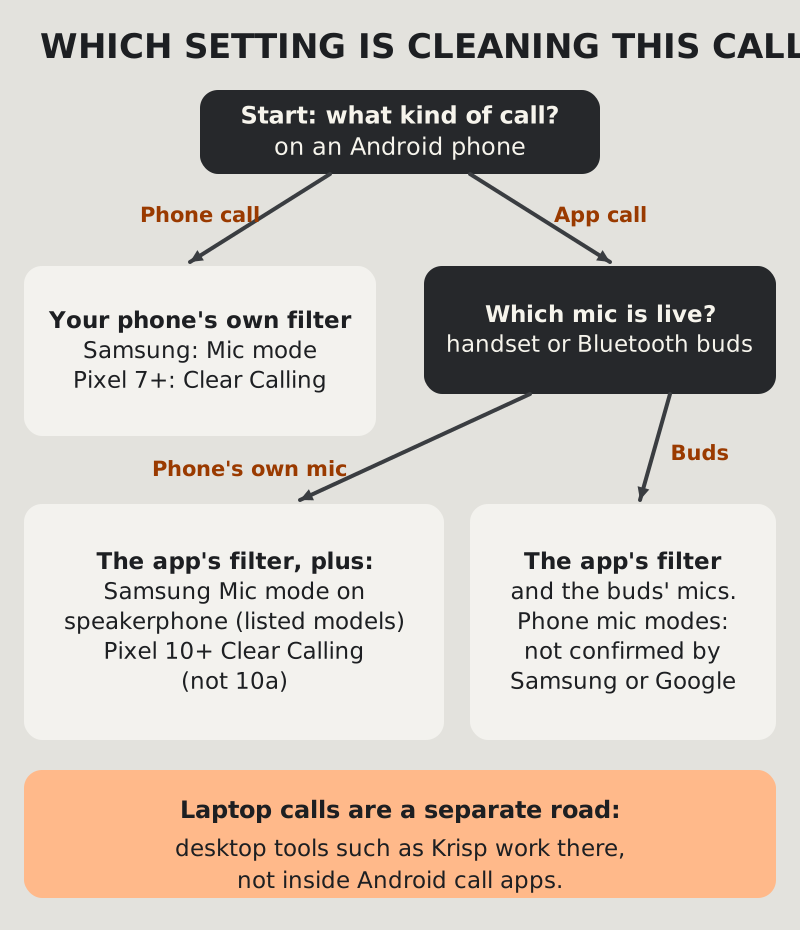
Do these settings apply in Zoom, Teams and Meet?
Partly, and only in two documented cases. Samsung's support note says Mic mode works "when using the speakerphone" in internet call apps, naming Zoom, Google Meet, Google Voice and Facebook Messenger among them. Its device list for that is specific: Galaxy S21 and S22 models, Z Flip3 to Flip5, Z Fold3 to Fold5, and Tab S8 and S9. On anything else, a missing tile during a Zoom call is the answer. On Pixel, Clear Calling reaches internet call apps only from Pixel 10, with the 10a left out.
Outside those cases, the meeting app is doing the work on its own. That has a practical upside. Each app's settings travel with your account, so learning them once covers every phone you will use:
- Zoom: Settings, then Audio, then Microphone modes. Noise removal is the default and adjusts automatically; Original sound for musicians switches processing off; Personalized audio isolation aims at your voice. More in our Zoom mobile guide.
- Teams: noise suppression runs on the mobile app, but the levels are only documented for iPhone. Our Teams mobile fixes cover what you can change.
- Google Meet: device-based noise cancellation on most Android phones, any account type. If the mic itself is the problem, start with Meet's mobile mic issues.
Stacking filters is not always better. Two noise processors in a row can make a voice sound thin or chopped at the start of words, because each one trims a little more of what it thinks is not speech. If a caller says you sound underwater, switch Voice focus back to Standard and let the app's filter work alone, then compare.
Not to be confused with Audio Eraser
Samsung's Audio Eraser and Google's Audio Magic Eraser often turn up in the same searches, but neither cleans a live call. Samsung's version edits recordings after the fact: videos in Gallery, Voice Recorder memos, Samsung Notes and call recordings made in the Phone app. Google's lives in Google Photos, works on video, and is limited to Pixel 8 and later phones, not tablets. They are useful for a voice memo recorded on a windy platform. They do nothing for the person listening to you right now.
When the phone is the wrong tool
A phone filter can only work with what its microphone hears. If you are holding the handset at arm's length on speaker in a busy café, no setting turns that into a clean signal; moving the mic closer to your mouth does more than any toggle. Wired earbuds with an inline mic, or the handset at your ear, beat speakerphone for that reason, and our earbuds versus phone mic comparison ranks the options place by place.
Then there is the laptop. Plenty of mobile workers take the important calls from a laptop in a hotel or a parked car, and that is where desktop noise cancellation fits. Krisp runs on Macs with macOS 14 or newer and on 64-bit Windows 10 and 11 PCs, sitting between your microphone and whichever call app you open. Its Android support does not extend to live noise cancellation, and Krisp's own help centre says the mobile app "doesn't support Noise Cancellation yet". It costs money after a 7-day, no-card trial: Core runs $8 per user per month on yearly billing, or $16 paid monthly, going by Krisp's pricing as read on 9 October 2026. The mobile workers' view of Krisp sets out which half of a travelling week it covers.
Edge cases
Voice focus makes you sound robotic
Heavy filtering can clip the start and end of words when the background is loud and constant, such as a train or road roar. Drop back to Standard for that call, move the phone closer to your mouth, and see which version your caller prefers.
The tile appears on one call and not the next
That is expected if one call was cellular and the other went through an app on a model outside Samsung's list, or if a Pixel call fell back on bandwidth. It is not a fault.
Older Galaxy phones
Samsung says "select newer" models without a cut-off date on that page. If the tile never appears on any call, your phone does not have the feature.
Quick answers
What does Voice focus do on a Samsung phone?
It raises the amount of audio filtering on your microphone so the other person hears more of your voice and less of the room. Standard filters a little; Full spectrum lets background sound through on purpose.
How do I reduce background noise on Android calls?
On Samsung, open Quick settings during the call and pick Voice focus under Mic mode. On a Pixel 7 or later, turn on Clear Calling in Sound & vibration. In meeting apps, use the app's own noise setting, and move the microphone closer to your mouth.
Why is Samsung Voice focus not working with Bluetooth?
Samsung's page does not cover Bluetooth. Users report the option disappearing once earbuds connect, which makes sense: the buds' microphones take over, so a phone-mic filter has nothing to process. Disconnect Bluetooth if you need it.
Does Pixel Clear Calling work in WhatsApp or Zoom?
On Pixel 10 and later, except the Pixel 10a, Google says Clear Calling supports internet call apps. On Pixel 7 to Pixel 9 it covers calls in the Pixel Phone app only, and it can switch off when call bandwidth is low.
Does Voice focus work in Zoom or Google Meet?
On speakerphone, on the models Samsung lists: the Galaxy S21 and S22 families, Z Flip3 to Flip5, Z Fold3 to Fold5, and Tab S8 and S9. Elsewhere, rely on the app's own noise filter.