Meetings on CarPlay and Android Auto: What Meet, Teams and Zoom Let You Do
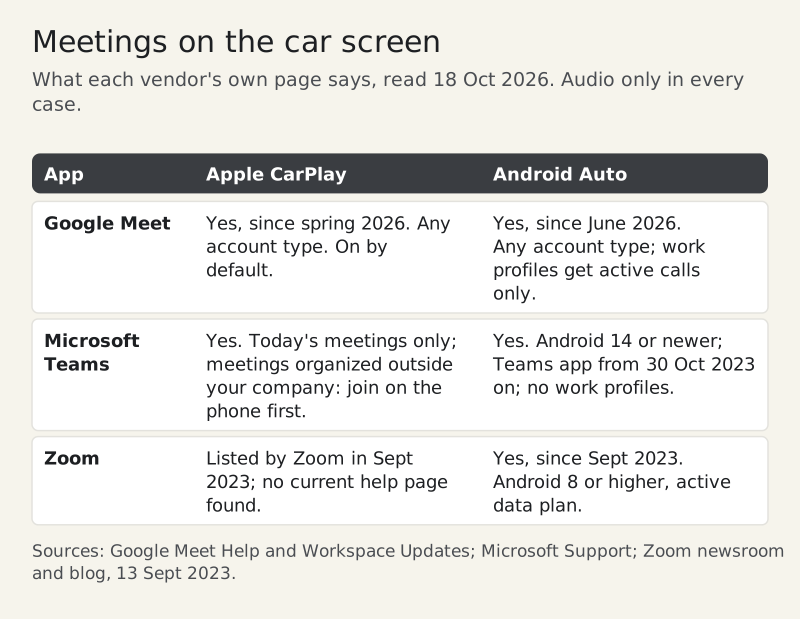
Google Meet, Microsoft Teams and Zoom can all join a meeting from your car's screen, and all three do it audio only. Meet arrived on Apple CarPlay in spring 2026 and on Android Auto in June 2026. Teams works on both, with a few account rules. Zoom launched on Android Auto in September 2023 and lists CarPlay among the car platforms it supports. In every case the camera is off, you cannot see shared screens, and anything that needs your eyes waits until you have parked. What differs is the small print: which phone version you need, whether a work account is allowed, and whether a meeting someone outside your company set up will even appear.
This field note sorts that small print app by app, then deals with the part the vendors leave out: how a car sounds to the people on the other end. Vendor pages read 18 Oct 2026. Use any of this only where hands-free calling is legal, and set it up before you pull away.
The matrix: app by app, platform by platform
Here is the short version, before the detail. Each cell is what the vendor's own page says, not what a forum thread reports.
Google Meet
On CarPlay you need a CarPlay car, an iPhone connected by Bluetooth or USB, and an up-to-date Meet app. Google says the feature is on by default and there is no admin switch for it, and it is available to Workspace customers, Workspace Individual subscribers and personal Google accounts. Tap the Meet app on the car display, open the Scheduled tab, and pick a meeting. The History tab calls a recent contact or group instead.
Android Auto works the same way with one large exception. Google's help page says work profile accounts are not supported: an active call still appears on the car display, but your upcoming meetings and call history will not. If your company puts Meet in a work profile, plan to start the call on the phone before you set off.
Microsoft Teams
On CarPlay, the Meetings tab lists that day's meetings, with a progress bar showing how far each one has run. All-day meetings stay hidden unless you select them. The catch most people hit: meetings organized outside your organization cannot be joined directly from CarPlay. Microsoft's workaround is to join on the phone first and then switch to CarPlay. Siri can also join for you; Microsoft's own example phrase is "Join my meeting on Teams."
On Android Auto, Teams needs an Android phone running Android 14 or newer and a Teams app released on or after October 30, 2023. Meetings without a Teams link cannot be joined, and if Teams lives in a work profile, Microsoft says it will not work until Android Auto supports work profiles.
Zoom
Zoom's Android Auto announcement, dated September 13, 2023, covers starting and joining scheduled meetings and audio-only calls from the car display, with video switched off automatically and mute and end handled by Android Auto. It asks for Android 8 or higher, an active data plan and the Android Auto app, at no additional cost. Zoom's blog from the same day names Apple CarPlay among the car platforms Zoom works with, but we found no current Zoom help page describing the CarPlay screens, so we don't describe them here.
Before you start the engine
Most failures on the road are setup failures, and they are cheap to avoid in the driveway. The phone has to have granted microphone access, accepted any privacy prompt, and be signed in, and Google's help pages say those prompts appear on the phone, not the car. You do not want to discover a permission dialog at a red light.
- Open the meeting app on the phone once, signed in, and accept every prompt.
- Connect to the car and confirm the app shows up on the dashboard.
- Check the meeting appears in the car's list. If it is someone else's Teams meeting on CarPlay, it may not.
- On Android, check whether your work apps sit in a work profile. Both Meet and Teams have limits there.
- Turn the climate fan down a notch before the call, not during it.
That last line is about sound, which is where the next section starts. Our car and street call guide has the longer version for calls taken on foot.
How you sound from the driver's seat
Connecting to the car moves the audio. Google's help page says that when your phone connects to CarPlay or Android Auto, meeting audio moves from your phone or earbuds to the car's speakers, and goes back to the previous device when you disconnect. Which microphone carries your voice then depends on the car's hands-free setup, which the meeting apps do not control. What you can control is the noise around that microphone.
Road roar, tyre noise on rough surfaces, the climate fan and an open window are the usual culprits, and the steady ones are the easier kind for any noise filter to handle. Gusts, indicator ticks and passing trucks are short and irregular, and they leak through. The practical moves are boring and they work: windows up, fan low, and mute whenever you are not speaking. Our note on mute habits on mobile turns that last one into a routine.
Meet adds one twist of its own. If you join a large meeting from the car, your microphone might be muted automatically, so check the Mic control on the screen before you start talking.
What you give up on the car screen
The car versions are deliberately thin. Google lists exactly what Meet drops on CarPlay and Android Auto, and Microsoft says Teams on CarPlay shows only some meeting controls.
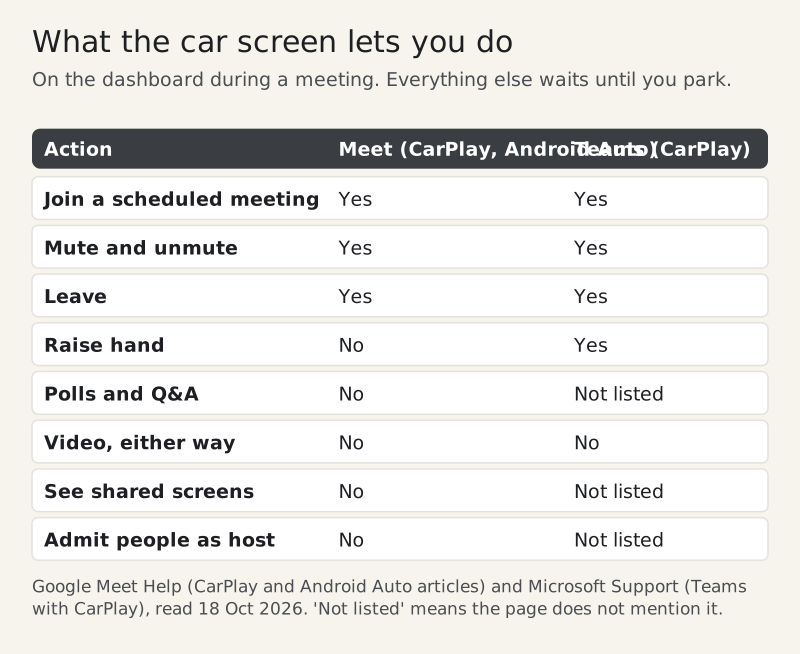
On Meet, the car display shows only the call details and controls, never presentations or other people. You cannot raise a hand, answer a poll or use Q&A, and a host cannot admit or reject anyone from the car. The phone switches itself into a simplified On-the-Go mode, and you join on both the phone and the car display at once. If the meeting is being recorded, transcribed or using Gemini, you hear a spoken notification instead of seeing a banner.
Teams on CarPlay goes slightly further. Tap the Teams icon on the left of the car screen during a call to reach the meeting view, where you can mute, raise your hand or leave. Video still stays off.
Edge cases
Waiting rooms and breakouts
If a Meet host has a waiting room on, the car screen shows a status message until you are admitted. If the host opens breakout rooms, Meet moves you into one automatically and back to the main room when the session ends.
Phones managed by your company
Microsoft notes that if Siri voice commands do not work with Teams, your IT admin may need to allow Siri and CarPlay for Teams on managed iPhones. External phone numbers are a separate permission: Teams can always call colleagues over Teams, but dialing a real phone number needs Teams Phone enabled on your account.
Hotspots and weak signal
The car screen does nothing about coverage. If the audio keeps dropping, our hotspot dropout checklist covers when to switch to dial-in audio instead.
Presenting or sharing your screen
None of these car integrations can share a screen. If you are presenting, the honest answer is to park, or move the slot.
Questions we get
Can I join a Google Meet meeting from Apple CarPlay?
Yes. Since spring 2026 Meet has a CarPlay app, on by default for anyone with the Meet app on an iPhone. Connect the phone, tap Meet on the car display, open Scheduled and pick the meeting. It is audio only, with your camera off.
Does Google Meet work on Android Auto?
Yes, since June 2026, for Workspace and personal Google accounts alike. Google says work profile accounts are not supported: an active call still shows on the display, but upcoming meetings and history do not.
Can I join a Teams meeting from my car?
Yes, on CarPlay and on Android Auto, audio only. On CarPlay, meetings organized outside your company must be joined on the phone first, then switched to the car. On Android Auto you need Android 14 or newer.
Does Zoom work with Android Auto and CarPlay?
Zoom launched on Android Auto in September 2023 for starting and joining scheduled meetings and audio-only calls, with Android 8 or higher. Zoom also lists CarPlay among its supported car platforms, though we found no current help page for it.
Can people see me when I join a meeting from the car?
No. Google, Microsoft and Zoom all keep video off in their car versions, and Meet also hides shared screens and other participants. If you need video or chat, park safely and use the phone app.